For in-house counsel whose hours go into contract and dispute files
AI for In-House Counsel Reading Contract and Dispute Files
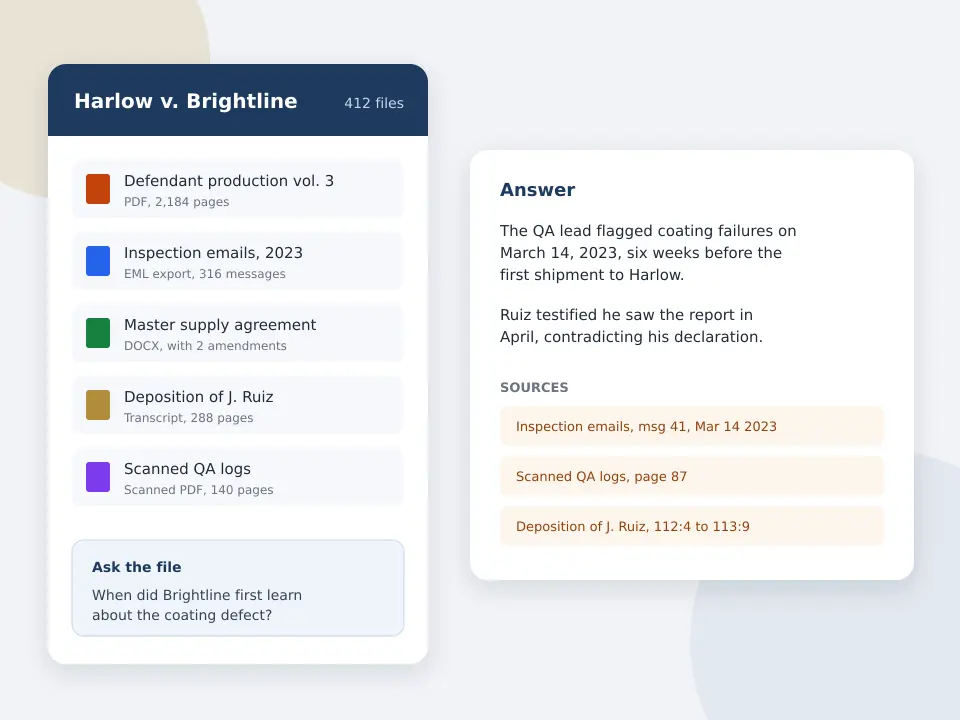
CaseClerk is AI for in-house counsel who need a stack of contracts, amendments, emails and vendor correspondence read before a renewal, a dispute or a board question. Upload the documents, ask in plain English, and get the answer with the document and page behind it. Solo is a flat $99 a month for 2,500 pages.
CaseClerk reads the documents you upload and cites the page. It does not draft contracts, redline, manage a contract repository or give legal advice. A lawyer opens and checks every cited page.
Try it on a contract file you already know
Upload a closed vendor dispute or a renewal binder and ask questions whose answers you know. Open each cited page and check. After signup, try 25 pages across up to 5 files, no card.
Free preview, no account needed: up to 3 files and 10 pages.
How can AI help in-house counsel with contract and dispute files?
AI helps in-house counsel by reading every agreement, amendment and email in a file and answering the questions that decide the matter, each with the page it came from. Which version of the liability cap governs, when notice was given, what the vendor promised in writing before signing. CaseClerk does this from $99 a month for 2,500 pages.
It reads. You decide. Every answer is a pointer to a page you open and verify before it goes into an email to the business, a demand letter or a board memo.
- $99
- Solo monthly plan, 2,500 pages read
- About $24
- To read a worked 600 page vendor file on Solo
- Page cites
- Every answer names the document and page
- 5 files
- Trial after signup, 25 pages, no card
What AI for in-house counsel has to do with a real file
- Find the clause that governs
- Upload the master agreement, order forms and amendments. Ask which limitation of liability, renewal term or notice period applies today, and which document says so.
- Read the email trail
- Exported correspondence runs to hundreds of pages. Ask what the vendor promised about delivery dates and which message the business relied on.
- Build a dated timeline
- Signature dates, notices, missed milestones and cure periods, ordered by date and linked to the page that states each one.
- Prepare for the renewal call
- Pull every price, term and obligation from a vendor's stack of documents into one list before you sit down with the business.
How a vendor file review works in CaseClerk
-
1
Create a matter for the dispute or vendor
One vault per matter keeps the documents apart from every other file.
-
2
Upload what you have
Agreements, amendments, order forms, emails, notices and memos. Scans are fine.
-
3
Ask the questions you would ask outside counsel
Which amendment changed the renewal term, when was notice given, what was agreed about service levels.
-
4
Open every cite
Read the passage in context and quote from the original page, never from the answer alone.
Ways an in-house team gets through a contract file
Most teams combine several. A lawyer reads the key documents, outside counsel takes the disputes that matter, a contract repository stores the signed agreements, and a cited reader answers questions about a pile of documents. CaseClerk is the reader and it is priced flat. The others win at their own jobs.
| Lawyer reading | Outside counsel | Contract repository | CaseClerk | |
|---|---|---|---|---|
| Main job | Judgment and advice | Disputes and opinions | Store and track agreements | Answer questions about the file |
| Cites the source page | Only if the notes do | In the memo | Not its job | Yes, document and page |
| New question on the same file | Another read | Another invoice | Search | Ask again, same file |
| Price model | Salary or internal time | Hourly or fixed fee | Quote or per seat | Flat monthly, $99 to $998 |
| Best for | Decisions only you can make | Litigation and complex advice | Renewal dates and signed copies | Fast, cheap first read of every file |
| Where it wins | Knowing the business | Court ready advice | Organized contract data | Price and cited answers |
Where in-house counsel use it
Before a vendor renewal
Read the agreement stack and list the price, term, notice and exit provisions you will negotiate against.
When a vendor dispute starts
Find what was promised, what was delivered and what notice was given, with the pages to cite.
Before briefing outside counsel
Hand over a dated chronology and the key passages instead of a shared folder of 400 files.
For a board or audit question
Pull the facts on one agreement or one incident from the whole record without a week of reading.
Why a contract file is where an in-house team loses hours
A vendor relationship grows by paper. The master agreement is signed, then come order forms, amendments, side emails and a few notices nobody filed. When a renewal or a dispute arrives, someone has to read all of it against everything else, and that someone is usually a lawyer who has other work.
A cited reader takes the first pass. For the dated narrative see case chronology software, and for finding where two versions disagree see document comparison software for lawyers. A general view of what a flat reader costs against per seat suites is on AI for small law firms.
A worked example, a 600 page vendor file
Say a software vendor dispute file holds the master agreement and four amendments (about 120 pages), six order forms (60 pages), 340 pages of exported email, 50 pages of support tickets and 30 pages of notices. That is 600 pages. On Solo, 2,500 pages cost $99 a month, so reading 600 pages uses 24 percent of the month, roughly $24.
Read by hand at an assumed 40 pages an hour, the same file is 15 hours. At an assumed internal cost of $150 an hour that is $2,250. Both numbers are assumptions, not measurements, and yours will differ. The shape matters: the reader runs once per file, and later questions reuse the file.
Who it is for and who it is not for
It suits in-house counsel and small legal teams who handle vendor, customer and employment files and read them without a paralegal. It also suits a general counsel at a company of a few dozen people, where the legal department is one person.
It is not a contract lifecycle system, a redlining tool or a drafting assistant. If you need approval workflows, a clause library or e-signature, you need a different product, and CaseClerk sits next to it. Check your company's policy and ABA Formal Opinion 512 before uploading confidential material to any AI tool.
AI for in-house counsel, questions from practitioners
Can AI review contracts for in-house counsel?
What does AI for in-house counsel cost?
Can it replace a contract management system?
Is it safe to upload company contracts?
Can it read scanned documents and email exports?

Read your next vendor file with cited answers
After signup, try 25 pages across up to 5 files, no card. Ask about terms, notices and promises, then open every source. Plans from $99 monthly.
Start free trialKeep reading
Case chronology software
A dated chronology with page cites.
Document comparison software
Where two versions or accounts disagree.
AI paralegal
A flat priced reader for paralegal hours.
AI for small law firms
What a flat reader costs against per seat suites.
Contract review software for law firms
Read and question contract sets.
Choose your plan
Put one matter in a vault and ask it the question you would ask a colleague
Sign up