Dated events pulled from the documents, each one cited
Case Chronology Software and Litigation Chronology Software With Cited Sources
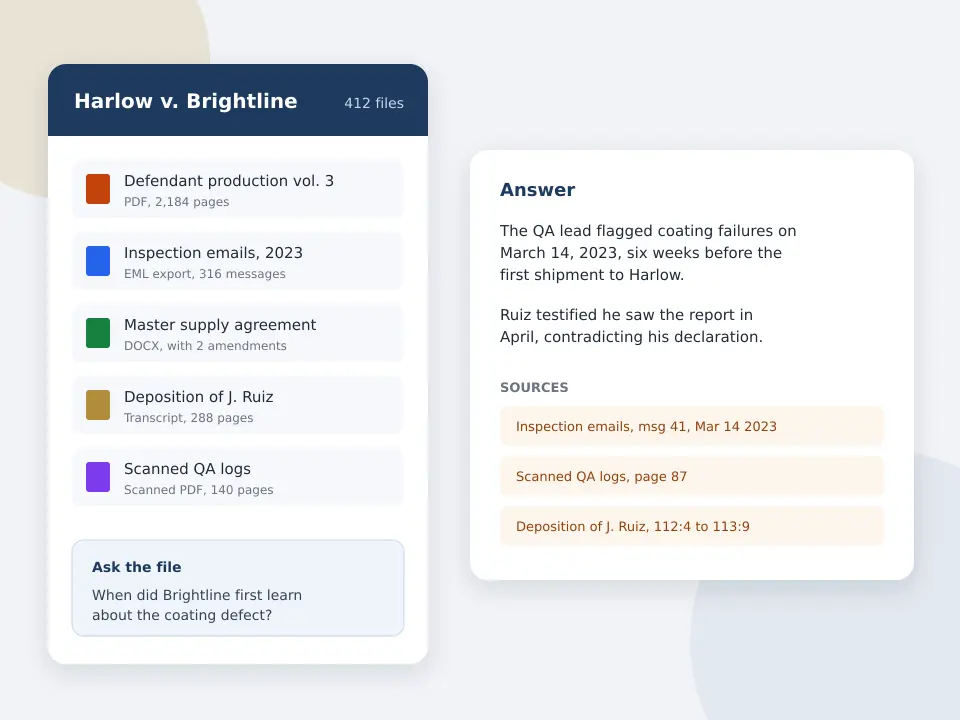
Case chronology software should save the days a paralegal spends typing dates into a spreadsheet. CaseClerk reads the documents in a matter and answers in date order, naming the document and page behind every event, so your team checks facts instead of finding them.
Competitor prices are labeled with their source. CaseClerk prices are the ones printed on our pricing page.
Build a cited chronology from one matter
Upload a closed case you know well and ask for every dated event in order. After signup, try 25 pages across up to 5 files, no card.
Free preview, no account needed: up to 3 files and 10 pages.
What is the best case chronology software for a litigation firm?
The best case chronology software pulls dated events out of your documents and cites the source of each one, so you verify instead of typing. Casefleet, CaseMap+ AI and Case Chronology are fact databases, sold per user or by quote. CaseClerk reads the case file and answers in date order with the document and page named, for a flat $99 to $998 a month per account.
- $99
- Solo plan, 2,500 pages read a month, per account
- Every line cited
- each event names its document and page
- Emails and scans
- PDF, Word, .eml, .msg and scanned records
- Yearly
- costs six monthly payments
What case chronology software has to do
- Find the dates for you
- The slow part is reading each document for a date and an event. The tool should do that reading across the whole file, including emails and scanned letters.
- Cite every entry
- A chronology line without a source is a liability at deposition. Each event has to name the document and page you can open and quote.
- Slice by witness or issue
- The master chronology is for the team. The one you take into a deposition covers one witness or one issue. Ask for exactly that slice.
- Show where dates conflict
- When testimony and a document disagree on timing, that is usually the argument. Ask where the dates differ and get both sources.
How to build a case chronology in CaseClerk
-
1
Upload the matter
Add the correspondence, records, pleadings and transcripts to one case. PDF, Word, email files and scans are read together.
-
2
Ask for the dated events
For example, every dated event involving the complaint, the supervisor and the termination, in date order, with sources.
-
3
Check each cited page
Open the document behind each line and confirm the date and wording against the original.
-
4
Narrow it for the next task
Ask for one witness, one issue or the conflicts between testimony and documents, and paste the verified list into your brief or outline.
Chronology by hand, fact database or cited reader
Three ways firms build a case chronology today, and where each one wins.
| Spreadsheet by hand | Fact database (Casefleet, CaseMap+ AI) | CaseClerk | |
|---|---|---|---|
| How events get in | A person types each one | Typed or extracted, then linked to evidence | Read from the documents and listed with sources |
| Time on a 300 document file | Days of paralegal reading | Less with AI extraction plans, still entry and linking | Minutes to the first list, then checking |
| Source per entry | Only if someone pastes it | Yes, linked | Yes, document and page named |
| Visual timeline for trial | Separate tool | Yes | No, paste the list into your presentation tool |
| Long term team workspace | Shared file | Yes, built for it | Case vaults with question history |
| Price | Staff time | Per user, or quote | $99 to $998 a month per account, printed |
Who buys case chronology software
Employment litigators
Line up the complaint, the reviews and the termination decision, and find the email that breaks the employer's timeline.
Personal injury firms
Order the treatment history, the claim file and adjuster notes, and see where the records differ from testimony.
Commercial litigation teams
Build the notice, delay and change order history of a contract dispute from correspondence before drafting the breach section.
Criminal defense practices
Order the stop, search and statements from reports and logs and check each line against the report it came from.
What a case chronology has to contain to survive a deposition
A case chronology is a date ordered list of the facts in a matter, with the document behind every fact. That last column is what separates a working chronology from a story. When opposing counsel asks where a date came from, or a witness says the meeting happened a week later, you need the email, letter or transcript page in seconds, not a search through a shared drive.
Most firms still build it by hand. A paralegal opens each document, types the date and a one line description into a spreadsheet, and pastes the Bates number. On a 300 document employment file that is two or three days of work before anyone reads the chronology for strategy. Case chronology software exists to cut those days, and the useful question when you buy one is simple: does it pull the dated events out of your documents, or does it give you a nicer place to type them?
Under the ABA Model Rule 1.1 duty of competence and its comment on technology, you remain responsible for every fact you rely on. A chronology tool that cites its source is the one you can actually check.
Worked example from a wrongful termination file
Take a retaliation case with 312 documents: HR emails, the employee handbook, three years of reviews, the termination letter and the supervisor's deposition transcript of 164 pages. Uploaded to one CaseClerk case, the file gets one request: List every dated event involving the pay complaint, the supervisor and the termination decision, in date order, with the source for each. The rows below show the shape of the answer (names changed).
| Date | Event | Source cited | Issue |
|---|---|---|---|
| 2025-01-14 | Plaintiff emails HR that her supervisor cut her overtime after she reported a pay gap | Email, Ruiz to HR, p. 1 | Protected activity |
| 2025-01-16 | HR opens a file and notes the complaint as 'pay concern' | HR intake notes, p. 2 | Notice to employer |
| 2025-02-03 | Supervisor rates plaintiff 'meets expectations' in the annual review | 2024 performance review, p. 4 | Pretext |
| 2025-03-10 | Supervisor writes to his manager that plaintiff 'has been difficult since January' | Email, Lane to Ortiz, p. 1 | Causation, timing |
| 2025-03-28 | Termination letter cites 'performance concerns' | Termination letter, p. 1 | Stated reason |
| 2025-03-28 | Supervisor testifies he made the decision 'in late February' | Lane deposition, p. 87 | Conflict with March 10 email |
The six lines above are the ones a litigator cares about, and the last one is the reason to build a chronology at all. The supervisor testified he decided in late February, but his own March 10 email shows the frustration starting in January, right after the complaint. That conflict is the retaliation argument. Because each row names the document and page, an associate can open both sources and confirm the wording before it goes into an opposition brief.
Two follow up questions finish the job. Which documents mention the overtime cut? gives the exhibit list for that issue. Where does the deposition testimony differ from the emails about timing? turns the chronology into a deposition outline for the next witness. That second step is covered in more depth on our deposition summary software page.
Case chronology software compared by price and how events get in
Chronology tools split into two groups. Some are databases where your team enters facts and links them to evidence, which is strong for a long trial team that maintains the chronology for a year. Others read the documents and draft the events for you to verify. Prices below are from the vendor where printed and labeled where they come from a listing.
| Tool | What it is | Price | Source |
|---|---|---|---|
| Case Chronology (Entangle Media) | Browser based chronology builder with reports, filters and calendars | Custom quote per organization | Vendor listing, LawNext directory |
| Casefleet | Fact chronology and case workspace, AI fact extraction on the top plan | $30 Starter, $140 Advanced AI per user a month, Enterprise quoted | casefleet.com/pricing |
| CaseMap+ AI (LexisNexis) | Fact and chronology database, successor to desktop CaseMap | Sales quote, no printed price | LexisNexis product pages |
| Everchron | Collaborative fact development and chronology for litigation teams | No published price found | Vendor site |
| Aeon Timeline | General timeline app with a litigation chronology template, events typed in | Per user licence on the vendor store | aeontimeline.com |
| CaseClerk | Reads the matter's documents and answers in date order, naming the source of each entry | $99, $249, $499 or $998 a month per account | caseclerk.ai/pricing |
If you need a visual timeline for a mediation board or a jury, keep a presentation tool, because CaseClerk is not one. Our legal timeline software comparison covers the visual tools, and Casefleet alternatives goes deeper on that product after its price change.
What a chronology costs per matter
A per user database charges the same whether the matter is busy or quiet, and you still pay a person to type. CaseClerk charges per account by pages read each month. Solo is $99 for 2,500 pages, Professional $249 for 10,000 pages, Firm $499 for 30,000 pages, and yearly billing costs six monthly payments. A 312 document file like the one above runs to roughly 1,900 pages, which fits inside one Solo month with room for a second smaller matter. Three attorneys sharing a Professional account and running four matters of that size a month pay $249 in total, not $249 a seat.
Medical heavy files work the same way. For personal injury records the math is laid out in what medical records chronology software costs, and litigation teams reading full productions should see AI for litigators.
Chronologies in criminal defense files
Defense chronologies lean on police reports, CAD logs, supplemental reports and charging documents. The arrest date and booking details are often checked against what the county has posted, for example through a public arrest record search, before they go into a suppression motion. Upload the discovery, ask for every dated event involving the stop, the search and the statements, and test each line against the report it cites. CaseClerk reads documents only. It does not transcribe video or audio, so body camera timing comes from the written reports and logs. More on that workflow in AI for criminal defense lawyers.
Questions about case chronology software
What is the best case chronology software?
How do you create a chronology for a legal case?
Can AI build a case chronology?
How much does case chronology software cost?
Get your next chronology out of the file today
Upload one matter, ask for every dated event in order and check the cited pages. After signup, try 25 pages across up to 5 files, no card. Plans from $99 a month.
Start free trialKeep reading
Legal timeline software
Visual and attorney timeline tools compared by job and price.
Deposition summary software
Page cited answers from testimony.
AI for litigators
Cited answers across productions and transcripts.
Casefleet alternatives
Chronology tools that print a price.
Medical records chronology software cost
Per page versus flat plans for PI records.
Choose your plan
Put one matter in a vault and ask it the question you would ask a colleague
Sign up