For litigators and small firms who need to see where the documents disagree
Document Comparison Software for Lawyers Across a Whole Matter
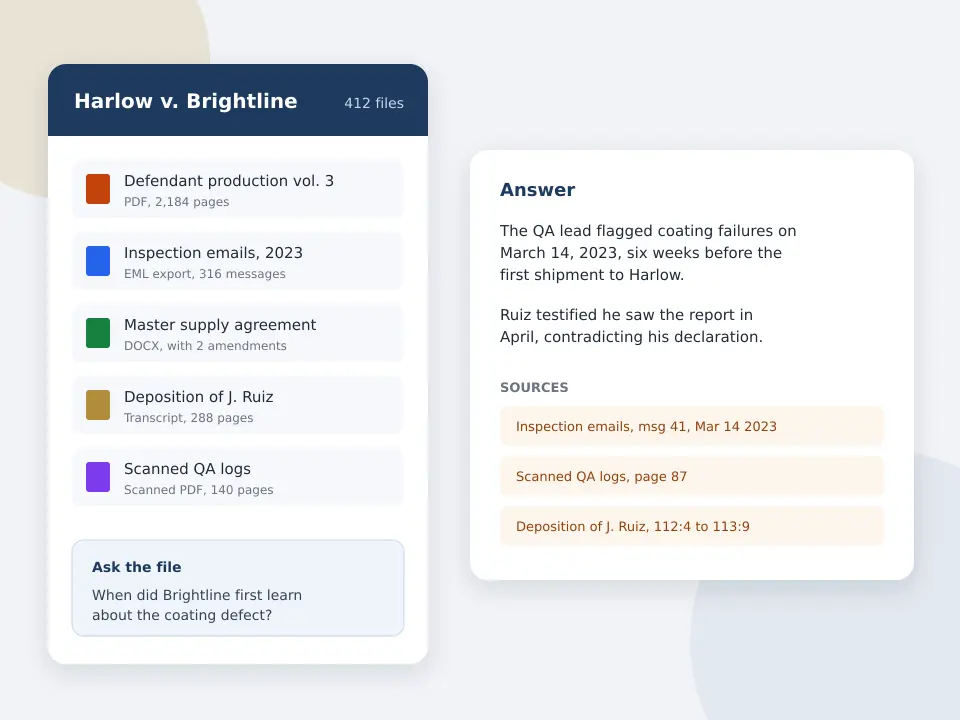
CaseClerk is document comparison software for lawyers who compare what the documents say, not their formatting. Ask where two accounts of a meeting differ, which figures do not match, or whether a date changed between versions of the story, and it answers with the document and page for each side. Solo is a flat $99 a month for 2,500 pages.
CaseClerk compares meaning across the documents you upload by answering your question. It is not a redline tool, does not produce a tracked changes file and does not give legal advice. A person checks every cited page.
Compare two accounts in your own file
Upload a file where you already know the accounts conflict and ask where they differ. Open both cited pages and check. After signup, try 25 pages across up to 5 files, no card.
Free preview, no account needed: up to 3 files and 10 pages.
What does document comparison software do for a lawyer?
It shows where documents disagree, so you do not find the conflict for the first time at the deposition. Two witness statements give different times, an invoice and a contract state different amounts, a later email contradicts an earlier one. CaseClerk answers a question like that across the whole matter and shows both sources with their pages, from $99 a month for 2,500 pages.
This is different from a redline tool. A redline shows what changed between two versions of one document. CaseClerk compares what many documents say about the same fact. If you need tracked changes between contract drafts, use a redline product for that step.
- $99
- Solo monthly plan, 2,500 pages read
- Both sides
- Each conflict names both documents and pages
- $249
- Professional, 10,000 pages a month
- 5 files
- Trial after signup, 25 pages, no card
What comparing accounts needs from the software
- Both sides, with pages
- A conflict is only useful if you can open both sources. Each answer lists the passages from each document with the page.
- Ask in plain words
- Ask which documents give a different date for the termination or whether the invoice total matches the contract. No query syntax.
- Across the whole matter
- Statements, emails, records and exhibits sit in one case vault and are compared together, not two PDFs at a time.
- Dates and figures
- Dates, amounts and names are the usual places accounts drift. Ask for every document that states one and see them lined up.
- Carry it into your work
- Take the cited passages into a cross outline, a mediation brief or a letter to opposing counsel.
How comparing documents works in CaseClerk
-
1
Upload the matter
Add statements, emails, records, contracts and exhibits to one case vault.
-
2
Ask where they differ
For example: where do the two accounts of the March meeting differ, or which documents give a different amount.
-
3
Open both cited pages
Read each side in the original. Checking two pages is faster than reading both documents cold.
-
4
Use the conflict
Export the answer with its citations into your outline, motion or negotiation notes.
Comparison questions and what you get back
These are the questions lawyers put to a file when they suspect two sources disagree, and what the answer contains.
| Comparison task | What you ask | What comes back |
|---|---|---|
| Two witness accounts | Where do the two statements about the incident differ | Passages from each statement with pages, side by side |
| Dates | Which documents give a different termination date | Each date, the document and page that states it |
| Amounts | Does the invoice total match the contract price | Both figures with their sources, or a note that no match was found |
| Story over time | Did the plaintiff's account change between the first email and the deposition | Earlier and later passages in date order |
| Between versions | Which drafts of the agreement mention the cap | Each draft that mentions it, with the page |
Answers are first drafts checked by a person against the cited pages. For a tracked changes file between two drafts, use a redline tool.
Where lawyers compare documents
Preparing a cross
Find where a witness's own documents contradict their testimony, with pages for each.
Insurance and damages disputes
Check claim figures against bills, estimates and policy terms in one pass.
Contract disputes
See where the signed agreement, the emails and the invoices give different terms or amounts.
Due diligence
Compare what a seller states in one document with what another document shows.
A worked example of comparing accounts in a 600 page file
Take a 600 page workplace injury file: two witness statements, incident reports, 150 emails, medical notes and a supervisor timeline. Finding every place the accounts of the incident differ by hand means reading and cross-noting everything. At about three hours per 100 pages, that is 18 hours, or $720 at a loaded $40 an hour. Those figures are assumptions, so use your own.
With CaseClerk the 600 pages are well inside the 2,500 pages a month on Solo at $99. You ask where the statements differ on time, location and who was present, then open each pair of cited pages. The review hours shrink to checking the conflicts, not hunting for them. Try it on a closed file first.
Who it is for and who it is not for
It is for litigators, paralegals and small firms who need to find conflicts between statements, records and contracts in large files. It suits personal injury, employment, insurance, commercial disputes and diligence work.
It is not a redline or tracked changes tool, it does not guarantee that every discrepancy is found, and it does not replace reading the documents that matter. Treat the output as a lead you verify.
What it costs
Solo is $99 a month for 2,500 pages, Professional is $249 for 10,000 pages and Firm is $499 for 30,000 pages. Pricing is per account, not per user. See the pricing page for the current plans.
Compare against official sources too
When a conflict goes in a filing, cite the original document, not the answer. For your duty when using AI tools, see ABA Formal Opinion 512. If you prepare a deposition around a conflict, our deposition summary software page shows the testimony side.
Questions about document comparison software for lawyers
What is document comparison software for lawyers?
Can AI find contradictions between witness statements?
Is CaseClerk a redline tool?
How much does it cost?
Can I compare more than two documents at once?
Find where your documents disagree
After signup, try 25 pages across up to 5 files, no card. Ask where the accounts differ and open every source. Plans from $99 monthly.
Start free trialKeep reading
AI case preparation software
Fact lists and gaps with cited pages.
Case chronology software
A sourced chronology from the file.
Deposition summary software
Page cited testimony answers.
AI for litigators
A worked production and per matter cost.
Legal document review software
Cited answers across a whole production.
Medical record review for attorneys
Records read with page cites.
Choose your plan
Put one matter in a vault and ask it the question you would ask a colleague
Sign up