For litigation and transactional teams at small US firms
Legal Document Analysis Software and Legal Document Review Software for Law Firms
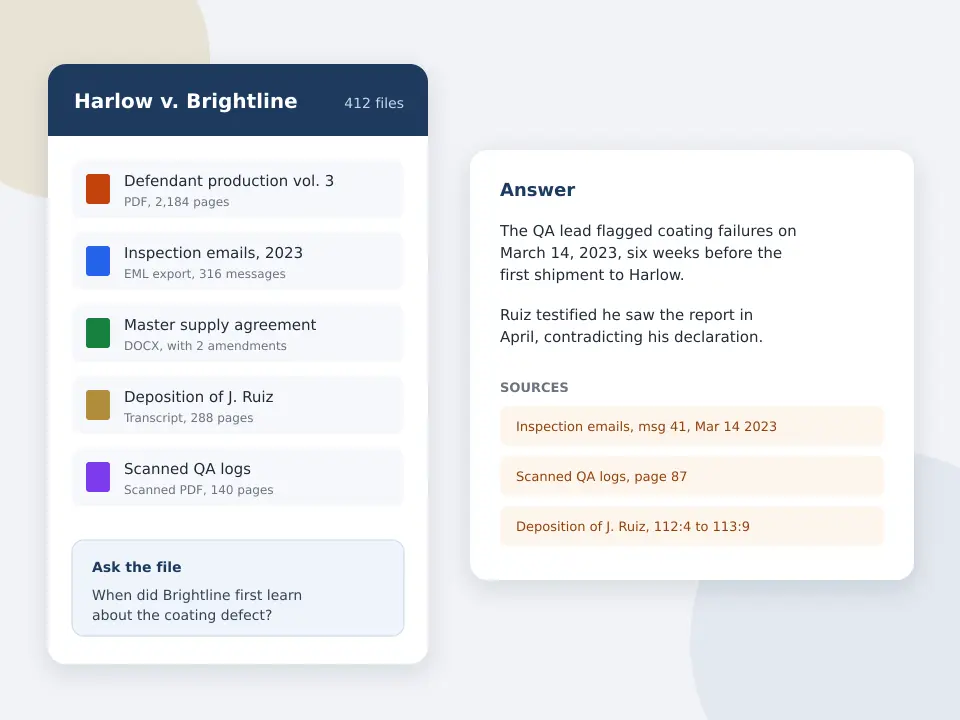
Upload the production, the client's document dump or the deal folder for one matter, then ask what it says. Who knew about the defect and when, which agreements carry a change of control clause, where the witness contradicts the email. Every answer names the document and page it came from.
Competitor details come from each vendor's own site or are labeled as reported. CaseClerk prices are the ones on our pricing page.
Review a matter's documents now
Drop in PDFs, Word files, emails and scans for one matter and ask across all of them. Every answer cites its source. 25 pages free, no card.
Free preview, no account needed: up to 3 files and 10 pages.
What legal document review software does a small firm actually need?
Most small firms do not need an ediscovery platform to review documents. They need software that reads a matter's files and answers questions about them with a citation. Ediscovery platforms such as Relativity and Everlaw are built for collecting, coding and producing large data sets, and they are priced by data volume through a sales quote. Legal document analysis software like CaseClerk reads the files you already have and tells you what is in them, page by page.
CaseClerk holds up to 1,000 files per case in 18 formats, at a published $99, $249 or $499 a month. It does not code documents for production or apply redactions. It shortens the reading.
- 1,000
- Files per matter in one CaseClerk vault
- 18
- File formats read, including scanned PDFs and email
- $99
- CaseClerk Solo per month, published, 2,500 pages
- 25
- Pages in the free trial, no card
What automated legal document review does for a matter
- Ask the whole file one question
- Type the question you would give an associate, for example every mention of the March inspection, and get one answer drawn from all the files with each source listed.
- Every answer names the page
- Each point in an answer cites the document it came from, and the page where the file has pages, so you can check it in seconds before it goes into a memo or a brief.
- Contract terms across the set
- Pull key terms, obligations and risks from every agreement in the folder, and compare one document against another, with each finding tied to its source file.
- Emails, scans and spreadsheets
- Read PDFs, Word files, email exports and scanned pages in 18 formats, so a client's mixed document dump does not need converting first.
- One vault per matter
- Keep each case's documents together in its own vault of up to 1,000 files, and come back to it as new productions arrive.
- Case files stay case files
- Documents you upload are not used to train any AI model of ours. Firm plans offer a confidentiality agreement.
How legal document review with CaseClerk works
-
1
Create a vault for the matter
Name it after the case and upload the files you have, a production, the client's emails, the contracts, the transcripts.
-
2
Ask in plain English
Ask the questions the case turns on. When did the buyer first raise the defect? Which leases have an assignment clause?
-
3
Check the cited source
Open the document and page each answer points to and confirm it, the way you would check an associate's summary.
-
4
Add documents as they come
Upload the next production into the same vault and ask again across everything.
Document review software for law firms compared by job and price
These tools do different jobs. Ediscovery platforms run collection, coding and production. Analysis tools read and answer. Prices are from each vendor's own page unless marked as reported.
| Tool | Main job | Pricing model | Best for |
|---|---|---|---|
| Relativity (RelativityOne) | Ediscovery review, coding and production at scale | Quoted through Relativity or a hosting partner | Large firms and litigation support teams with big productions |
| Everlaw | Cloud ediscovery with review, productions, deposition tools and AI features | Quoted. Its pricing page lists unlimited user licenses, with some AI features billed in credits | Litigation teams that produce and receive large volumes |
| Lexis+ Document Analysis | Checks a brief or filing against case law, citations and precedent | Part of a Lexis+ subscription, quoted | Research and brief checking, not reading a production |
| Kira and Luminance | Contract extraction and diligence review | Quoted, reported at enterprise levels | M&A and large contract portfolios |
| CaseClerk | Reads a matter's documents and answers questions with the source cited | Published, $99, $249 or $499 a month per account | Small firms that need the file read this week without a platform contract |
If you must produce documents with Bates numbers, privilege logs and redactions, you need an ediscovery platform. CaseClerk sits before or beside it, for understanding what the documents say.
Who uses legal document analysis software like this
Litigators reading the other side's production
Find what the documents say about the issues in the complaint before the deposition, without paging through every PDF.
Transactional lawyers with a deal folder
Pull the assignment, change of control and termination terms from every agreement in the data room and compare them.
Plaintiff firms with medical and insurance records
Ask what the records say about treatment dates, diagnoses and billed amounts, each answer tied to the page.
Solo lawyers taking over a matter
Read a predecessor's file quickly and get a sourced picture of where the case stands.
What software do lawyers use for document review?
Lawyers use two kinds of software for document review. Large litigation teams use ediscovery platforms such as Relativity and Everlaw, which process data, let reviewers code documents and generate productions. Smaller firms and transactional lawyers increasingly use AI document analysis tools that read a set of files and answer questions about them, citing the document and page.
The split matters because the price models differ. Ediscovery platforms are usually quoted by data volume, often with an annual commitment. Our breakdown of what Everlaw costs a small litigation firm shows how far apart the reported numbers are. A reading tool priced per month by pages is easier to budget for a five lawyer office.
Can AI do legal document review?
Yes, AI can do the first pass of legal document review, finding the passages that matter, summarizing them and pointing to where they are. It cannot take responsibility for the result. Under ABA Formal Opinion 512, the lawyer still has to verify AI output, which is why a tool that cites the exact document and page is worth more than one that only gives an answer.
CaseClerk is built around that check. Every answer lists its sources, so verifying a point takes a click instead of a search.
How much does document review software cost?
Document review software for law firms runs from a published monthly price to six figure annual contracts. Ediscovery platforms are usually quoted by data volume, and third-party reports for Everlaw run from a few hundred dollars a month for small cases to well over $20,000 a year. CaseClerk is published at $99, $249 or $499 a month.
When you compare quotes, ask for the total for your real matter size, including hosting after the case closes, any AI credits, and the contract term. A per gigabyte rate looks small until a production arrives.
Litigation document review software or a reading tool?
Pick litigation document review software, meaning an ediscovery platform, when you have to collect from custodians, code tens of thousands of documents with a team, log privilege and produce. Pick a reading tool when the documents are already in hand and the job is to understand them, before a deposition, a mediation or a motion.
Many firms use both. The platform handles the production obligations, and the reading tool answers the questions the partners ask about the documents that matter. If contracts are the main workload, see our page on AI contract review software, and for a deal data room, AI due diligence software.
Legal document review software questions
What is the best document review software for a small law firm?
For a small firm that mainly needs to understand a set of documents, the best fit is usually an AI analysis tool with a published price and cited answers, rather than an ediscovery platform. If you must produce documents with privilege logs and Bates numbers, add an ediscovery platform for that job.
What is automated legal document review?
Automated legal document review uses software to read documents and surface the relevant passages, terms or facts, instead of a lawyer reading every page first. Good tools show where each finding came from so the lawyer can verify it, which ABA Formal Opinion 512 expects.
Is legal document analysis software accurate enough to rely on?
It is accurate enough for a first pass, not for an unverified final answer. Treat it like a capable junior reviewer. CaseClerk cites the document and page behind each answer so you can confirm the point quickly before you rely on it.
How many documents can CaseClerk review at once?
A CaseClerk matter vault holds up to 1,000 files in 18 formats. Plans are sized by pages read each month, 2,500 on Solo, 10,000 on Professional and 30,000 on Firm, with an Enterprise tier quoted for larger volumes.
Does CaseClerk replace Relativity or Everlaw?
No, not for productions. Relativity and Everlaw handle ESI processing, coding, privilege logs and production. CaseClerk reads documents and answers questions about them. A small firm that receives a production but rarely produces large volumes may find CaseClerk covers what it actually does day to day.
Are my documents used to train AI?
No. Documents uploaded to CaseClerk are not used to train any AI model of ours. Firm plans offer a confidentiality agreement.
Read the next production in an afternoon
Upload one matter's documents, ask the questions the case turns on, and check every cited page. 25 pages free, no card, then plans from $99 a month.
Start Case AnalysisKeep reading
AI contract review software
Read a whole set of agreements and amendments at once, with every answer sourced.
AI due diligence software
Work through a deal data room and pull the terms that change the price.
Everlaw pricing
What Everlaw is reported to cost, what its own pages say, and what to ask in the quote.
Casetext alternative
Where each Casetext job moved, and a flat priced replacement for document review.
Choose your plan
Put one matter in a vault and ask it the question you would ask a colleague
Sign up