For litigators who summarize depositions
Deposition Summary Software for Law Firms With Page Cites
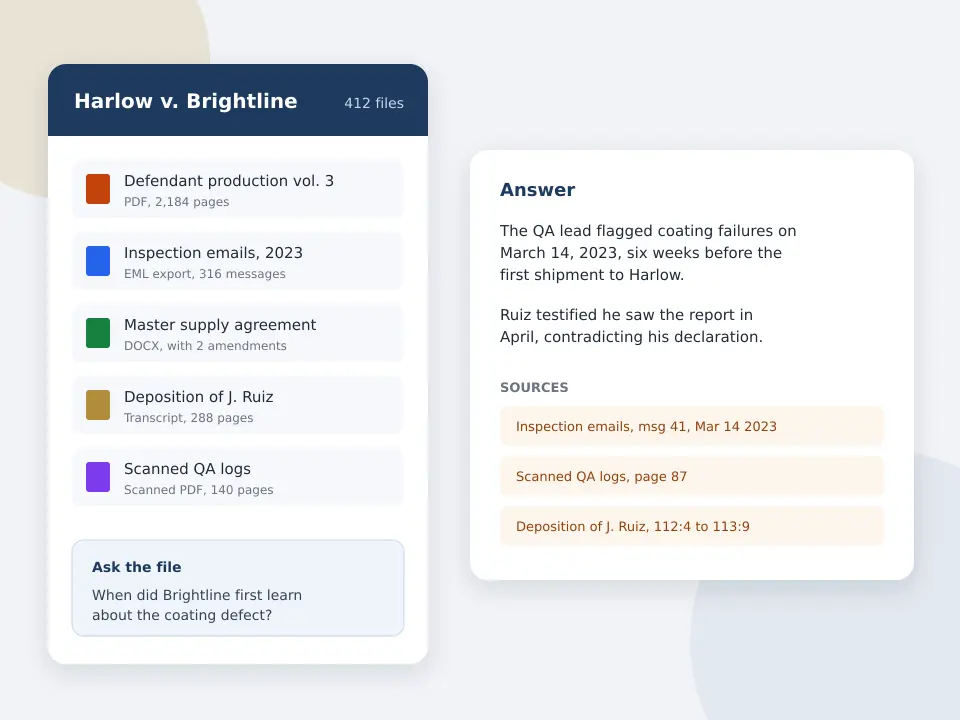
A 300 page transcript takes a paralegal most of a day to digest, and a summary with no page cites cannot be used at a hearing or in a motion. CaseClerk reads the transcript you upload, answers questions about the testimony in plain English, and names the document and page behind every answer. This page explains what deposition summary software should do, what to check before buying, and where a reading tool fits against a court reporting add on or a full litigation platform.
Capabilities described for other products are general categories, not vendor quotes. CaseClerk plans and limits are the ones printed on its pricing page.
Test it on a transcript you already know
Upload a closed matter transcript and ask questions with known answers. Every answer names its source. After signup, try 25 pages across up to 5 files, no card.
Free preview, no account needed: up to 3 files and 10 pages.
What is the best deposition summary software?
The best deposition summary software reads the full transcript, answers in plain English and gives a page and line cite for every statement, so you can verify it before it reaches a motion. CaseClerk does this from $99 a month per account, and it can read the exhibits, emails and agreements beside the transcript, which a stand alone summarizer usually cannot. See legal document review software for the wider reading workflow.
- $99
- CaseClerk Solo monthly for 2,500 pages read
- Page cites
- Every answer names the document and page it came from
- 5 files
- Trial after signup, 25 pages, no card
- $998
- Enterprise monthly plan for high volume matters
What deposition summary software should do before you pay for it
- Page and line cites
- A summary line that says the witness admitted notice is useless without the page. Check that each statement points to the page of the transcript, and test five of them by opening the page.
- Testimony against the record
- The valuable question is where the witness differs from the email, the contract or the medical record. A tool that only sees the transcript cannot answer it.
- Topic and issue summaries
- A page by page digest is one format. Many lawyers want testimony grouped by issue, such as notice, causation or damages. Ask in plain English and get that grouping.
- Confidentiality terms
- Transcripts hold client confidences. Read the vendor terms on retention, training on your data and deletion, and keep a copy of what you agreed to.
- A printed price
- Summary services priced per transcript page add up fast. A flat monthly plan with a published page allowance is easier to budget across a docket.
- Scanned transcripts
- Many transcripts arrive as PDFs or scans. Confirm the tool reads them and check one scanned page against the original.
How to summarize a deposition with CaseClerk
-
1
Upload the transcript and exhibits
Add the transcript, the exhibits marked at the deposition and the key emails or agreements in the same matter.
-
2
Ask for the testimony you need
For example, what did the witness say about the date they learned of the defect, and which document supports or contradicts that.
-
3
Open every cite you will rely on
Each answer names the document and page. Open it, read the passage and confirm the wording before you quote it.
-
4
Save the questions as your outline
The questions you asked become the skeleton of the deposition digest or the cross outline for the next witness.
Ways to get a deposition summary and what each costs in time
The options trade speed, price and the ability to check testimony against other documents. CaseClerk fits firms that want sourced answers across the whole file at a flat monthly price. Large platforms win when the whole case lives inside them already.
| Paralegal digest | Court reporter or vendor summary | Litigation platform AI | CaseClerk | |
|---|---|---|---|---|
| Price model | Hourly time | Often per page or per transcript, confirm with the vendor | Seat or matter fee, often by quote | Flat monthly plan, $99 to $998 |
| Turnaround | Hours to a day per transcript | Days | Minutes after upload | Minutes after upload |
| Page cites | Yes, by hand | Usually yes | Varies by product | Yes, every answer names its source |
| Checks testimony against emails and contracts | Only with more hours | Rarely | If the documents are in the platform | Yes, in the same matter |
| Best for | Judgment calls and strategy | Sworn transcript handling | Firms already inside the platform | Fast sourced answers across the file |
| Where it wins | Context and nuance | Certified record | Integrated workflow | Flat price and cited answers |
Where litigators use deposition summary software
Preparing the next witness
Ask what earlier witnesses said about the same event, then draft questions from the gaps and conflicts.
Motion for summary judgment
Pull every statement on an element with page cites, then verify each cite before it goes in the brief.
Settlement and mediation
Build a one page chronology of key testimony, each point tied to a transcript page, for the mediator.
Associate and paralegal review
Give a first pass to the tool, then spend billable time on judgment instead of retyping what the witness said.
Deposition summary software, the types and what each is for
The phrase covers three things. A transcript digest is a page by page or topic summary. A testimony search tool finds what was said on a subject. A comparison tool tests the testimony against the rest of the record. CaseClerk does the second and third from plain English questions and names the page, which suits a small litigation team that has no time for a full digest of every transcript.
For the timeline side, see legal timeline software. For the wider preparation workflow, see trial preparation software, and if your documents come in a large production, read ediscovery software for small law firms.
A worked example with a 280 page transcript
Say a plaintiff firm holds a 280 page deposition of a facility manager and 40 pages of incident emails. That is 320 pages against the $99 plan allowance of 2,500 pages, so the whole set fits in a month with room for four more matters of similar size. The question to ask is narrow, such as when the manager first learned of the leak and whether any email shows an earlier date. The answer names the transcript page and the email, and you open both before you rely on either. The point of the exercise is not to replace the digest, it is to find the conflict in minutes instead of reading 320 pages.
Rules of evidence and checking the cite
Use any summary only as a finding aid. The transcript is the record, and under the Federal Rule of Civil Procedure 30 process the certified transcript controls. Open the page, read the passage in context and quote from the transcript, not from the summary.
Deposition summary software questions from litigators
What is the best deposition summary software?
Can AI summarize a deposition transcript accurately?
How much does deposition summary software cost?
Can it compare a witness statement to other documents?
Can I try it before paying?

Summarize your next deposition with page cites
After signup, try 25 pages across up to 5 files, no card. Ask about the testimony and open every source. Plans from $99 monthly.
Start free trialKeep reading
Legal timeline software
A dated chronology with every event cited.
Trial preparation software
Questions, exhibits and sourced answers.
Legal document review software
Sourced answers from the documents you hold.
Casefleet alternatives
Per user case software against a flat reader.
eDiscovery software for small law firms
Per GB platforms against a $99 reader.
Supio alternatives
Records reading for personal injury firms.
Choose your plan
Put one matter in a vault and ask it the question you would ask a colleague
Sign up