For criminal defense lawyers buried in discovery
AI for Criminal Defense Lawyers and AI for Criminal Defense Discovery
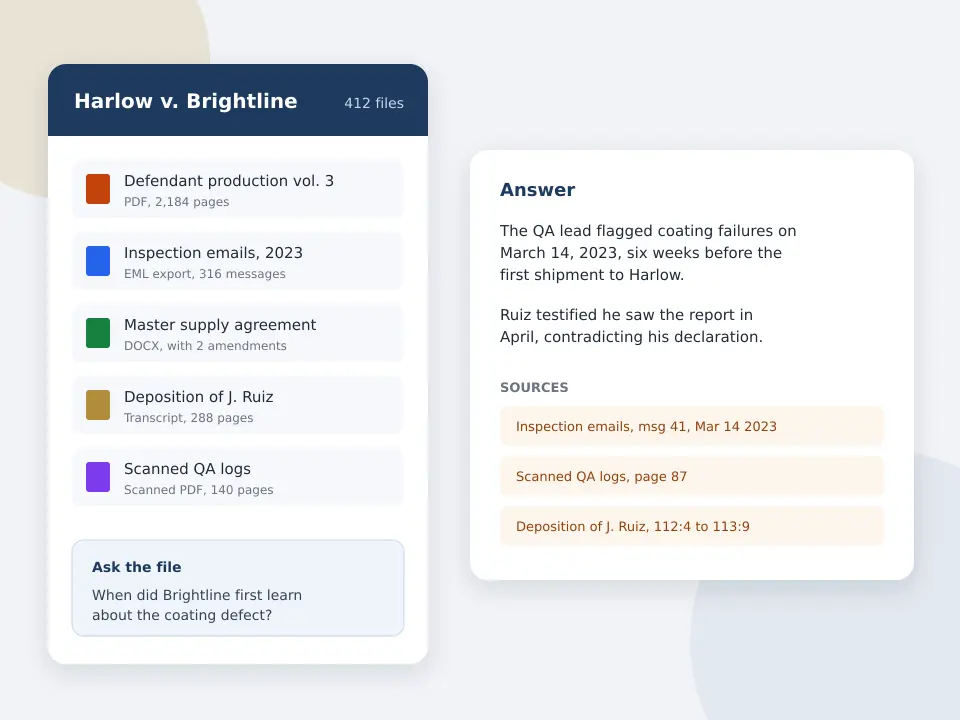
A felony discovery packet can run to thousands of pages of police reports, supplemental narratives, lab results, phone extraction reports and jail call transcripts, and the defense usually gets it late. CaseClerk reads the documents you upload, answers plain English questions about them and names the document and page behind every answer, so you find the inconsistency in the officer narratives before the suppression hearing, not after.
CaseClerk reads documents and transcripts. It does not transcribe video or audio. Plans and limits are the ones printed on the pricing page.
Test it on a closed case file
Upload reports from a case you already know and ask questions with known answers. Every answer names its source. After signup, try 25 pages across up to 5 files, no card.
Free preview, no account needed: up to 3 files and 10 pages.
What is the best AI for criminal defense lawyers?
The best AI for criminal defense lawyers reads the whole discovery production, answers questions in plain English and cites the report and page behind each answer, so nothing reaches a motion unchecked. CaseClerk does this from $99 a month per account with no seat minimum. Research tools find case law. CaseClerk reads your client's file. For the wider reading workflow see legal document review software.
- $99
- Solo monthly plan for 2,500 pages read
- Page cites
- Every answer names the document and page
- 1,000 files
- Per case, from reports to jail call transcripts
- 5 files
- Trial after signup, 25 pages, no card
What criminal defense AI has to do before you trust it with a client file
- Cite the report and page
- An answer that says the officer saw the bag in plain view is worthless without the page. Check that every answer points to a report and page you can open, and test five of them against the original.
- Compare officer narratives
- The defense value is in the differences. The tool should tell you where the arresting officer, the backup officer and the CAD log disagree on time, location or sequence.
- Read scans and photos of paper
- Discovery often arrives as scanned PDFs or TIFF images. Confirm the tool reads them, then check one scanned page by hand.
- Read emails and exported messages
- Phone extraction reports and exported email threads are text. A tool that reads .eml and .msg files and long PDF reports saves the most hours on digital evidence.
- Confidentiality you can read
- Client confidences and sealed material are in the file. Read the vendor terms on retention, training on your data and deletion before you upload anything.
- A price a defense practice can carry
- Most criminal defense work is flat fee or appointed. A printed monthly price with a page allowance fits that budget better than a per seat quote with a ten seat floor.
How defense lawyers use CaseClerk on a discovery production
-
1
Upload the discovery as you received it
Add the incident report, supplements, CAD and dispatch logs, lab reports, warrant and affidavit, and any transcripts of bodycam, 911 or jail calls you already have.
-
2
Ask the defense questions
For example, what time does each report give for the stop, and does any report say consent was given before or after the search.
-
3
Open every cite before you use it
Each answer names the document and page. Read the passage in context before it goes into a motion, a cross outline or a client letter.
-
4
Turn the answers into your outline
The questions and cited answers become the skeleton of the suppression motion, the cross of the officer or the mitigation memo.
AI options for a criminal defense practice and where each wins
Defense lawyers mix tools. Research platforms find law, transcription tools turn video into text, and a reader answers questions about the file. CaseClerk is the reader, priced flat. Each other category wins at its own job.
| Legal research AI | Bodycam and audio transcription tools | Case management with AI | CaseClerk | |
|---|---|---|---|---|
| Main job | Find and summarize case law | Turn video and calls into searchable text | Calendar, billing, client records | Answer questions about the documents you hold |
| Reads your discovery | Limited, research first | Media only | Stores it, light reading | Yes, up to 1,000 files per case |
| Cites the source page | Cites authorities | Cites timestamps | Varies | Yes, document and page |
| Typical price model | Per user, often by quote | Per hour of media or per user | Per user per month | Flat monthly, $99 to $998 |
| Best for | Briefing the law | High video volume | Running the office | Finding facts and conflicts in the file |
| Where it wins | Authority and citators | Video review speed | One place for the practice | Price and cited answers across the file |
Where defense lawyers use a cited reader
Suppression motions
Pull every statement about the stop, the consent and the search, with report and page, then check the timeline against the CAD log.
Cross examination of officers
Ask where each officer contradicts another report or their own earlier narrative, and build the impeachment from the cited pages.
Plea evaluation
Get a sourced summary of the strongest and weakest evidence for the client meeting, every point tied to a page you can show.
Mitigation and sentencing
Read school, medical and treatment records for the facts that support mitigation, with the page for each one.
Why discovery reading is the bottleneck in a defense practice
Under Federal Rule of Criminal Procedure 16 and its state counterparts, the government hands over reports, statements, test results and documents, and the volume keeps growing as phone extractions and digital evidence become routine. A solo defense lawyer carrying forty open files cannot read every supplemental narrative twice. The cases are lost and won on details, a time that does not match, a second officer who never mentions the consent, a lab report with a chain of custody gap.
Research platforms are built to find law. They are good at it, and you still need one. What they do not do well is read your client's 1,800 page production and tell you that the backup officer puts the stop four minutes after the arresting officer does. That is the job a cited reader does. If you are pricing a research subscription at the same time, our Westlaw pricing for solo practitioners breakdown shows what the research side costs.
A worked example with a DUI and possession file
Take a DUI with a possession count. The production is an arrest report (6 pages), two supplemental narratives (9 pages), the CAD and dispatch log (4 pages), the breath test record and maintenance log (22 pages), the tow inventory (3 pages), a lab report on the substance (8 pages) and a 140 page transcript of the bodycam audio prepared by an outside service. That is 192 pages, well inside the 2,500 pages a month on the $99 Solo plan, so a solo can run about a dozen files of that size in a month.
Questions that pay for themselves on a file like this:
- What time does each report give for the initial stop, and what time does the CAD log show?
- Which document records the reason for the stop, and do the reports give the same reason?
- Where is consent to search mentioned, and is it before or after the inventory?
- When was the breath instrument last certified, according to the maintenance log?
- Does the lab report chain of custody match the evidence numbers in the tow inventory?
Every answer comes back with the document and page. You open each one, confirm the wording and only then put it in the motion. The work that used to fill an evening becomes the time it takes to verify the cites. For a date ordered view of the same file, see legal timeline software.
What CaseClerk does not do in a criminal case
Be clear about the limits before you buy. CaseClerk does not transcribe bodycam video, dashcam footage, 911 audio or jail calls. If you need that, use a transcription service first and upload the transcript, which CaseClerk then reads like any other document. It does not research case law, it does not draft motions for you and it does not replace your judgment on what a fact means for the defense. It reads the file you upload and tells you where each answer came from.
For deposition style testimony in related civil matters, deposition summary software covers the transcript workflow, and firms that receive very large productions should read ediscovery software for small law firms to decide whether they need a hosted review platform.
Ethics and confidentiality for defense lawyers using AI
The ABA Formal Opinion 512 asks lawyers who use generative AI to understand the tool, protect client information, verify output and bill fairly. In practice that means reading the vendor terms on retention and training, keeping the client informed where your state requires it, and never filing anything the tool said without opening the source page. A tool that cites every answer makes the verification step fast, which is the point. Check your state bar guidance as well, since several states have issued their own opinions.
What it costs against the alternatives
CaseClerk prints its plans. Solo is $99 a month for 2,500 pages, Professional $249 for 10,000 pages, Firm $499 for 30,000 pages and Enterprise $998 for 60,000 pages, with annual billing at six months' price. There is no per seat minimum. A defense practice that reads 200 pages a file and opens ten files a month fits the Solo plan. Paying a paralegal or contract reader for the same pages, or a per seat AI platform sold by quote, usually costs more for a small office. See CaseClerk pricing for the full table, and the legal AI pricing comparison for what other tools charge per seat.
Questions criminal defense lawyers ask about AI
What is the best AI for criminal defense lawyers?
Can AI review police reports for inconsistencies?
Can AI analyze bodycam footage?
Is it ethical for defense lawyers to use AI on client files?
How much does AI for criminal defense cost?
Read your next discovery production with cited answers
After signup, try 25 pages across up to 5 files, no card. Ask about the reports and open every source. Plans from $99 monthly.
Start free trialKeep reading
Legal timeline software
A dated chronology with every event cited.
Trial preparation software
Questions, exhibits and sourced answers.
Deposition summary software
Testimony answers with page cites.
Westlaw pricing for solo practitioners
What the research side costs per month.
eDiscovery software for small law firms
Per GB platforms against a $99 reader.
Choose your plan
Put one matter in a vault and ask it the question you would ask a colleague
Sign up