Case chronology from the documents, with every source named
Legal Timeline Software and Case Chronology Software for Litigation Timelines
Legal timeline software turns the documents in a matter into a dated sequence of events you can test, argue from and show. Most tools ask you to type each event in by hand or sell AI chronology behind a sales call. CaseClerk reads the case file you upload and answers in date order with the document named for every entry.
Competitor prices are labeled with their source. CaseClerk prices are the ones on our pricing page.
Build a cited chronology from your case file
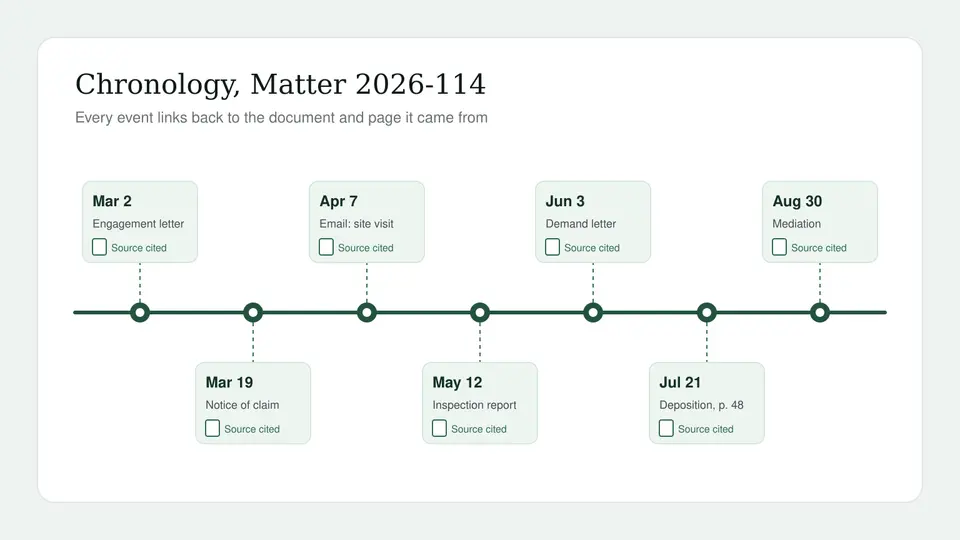
Upload one matter's documents and ask for every dated event in order. Each entry names the file it came from. 25 pages on the house, no card.
Free preview, no account needed: up to 3 files and 10 pages.
What is the best legal timeline software for a small litigation firm?
The best legal timeline software is the one that builds the chronology from your documents and links every entry back to its source. CaseMap+ AI and Opus 2 do that inside larger litigation platforms sold by quote. Casefleet publishes $30 and $140 per user plans. TrialLine is built for presenting a visual timeline at mediation or trial.
If your bottleneck is reading the file, not drawing the graphic, CaseClerk is the faster buy. Upload the matter, ask for every dated event involving a party or an issue, and get a list in date order with the document named on each line. It costs a published $99, $249 or $499 a month per account.
- Up to 1,000
- files per case, read together, not one at a time
- 18
- file formats, from PDF and Word to emails (.eml, .msg) and scans
- Every line cited
- each event names the document it came from
- $99
- CaseClerk Solo, published, per month, no sales call
What legal timeline software has to do for a litigator
- Pull events from the documents
- Typing events into a spreadsheet is the slow part. The tool should find the dates in emails, letters, reports and transcripts for you.
- Cite the source of every event
- A chronology you cannot trace is a liability at deposition. Each entry has to point to the document it came from so you can check it in seconds.
- Filter by party, witness or issue
- The full chronology is for you. The one you use at a deposition covers one witness. Ask for exactly that slice.
- Surface conflicting dates
- Two documents that put the same meeting on different days are often the case. Ask where the file disagrees with itself.
- Grow with the matter
- Productions arrive in waves. Add the new documents to the same case and ask again, so the chronology reflects the whole file.
- A price you can read before the demo
- Many chronology platforms quote only. CaseClerk prints its prices and lets you test on your own documents first.
How to build a case chronology with CaseClerk
-
1
Open a case and upload the file
Drop in pleadings, correspondence, contracts, reports, transcripts and scans. Up to 1,000 files per case in 18 formats.
-
2
Ask for the events in date order
For example: list every dated event involving the site inspection, oldest first, with the document for each.
-
3
Check the cited sources
Each line names its document. Open the ones that matter and confirm the date and the wording before you rely on them.
-
4
Narrow it for the task at hand
Ask again for one witness, one issue or one date range, and paste the result into your memo, outline or visual timeline tool.
Legal timeline software compared by job and price
These tools overlap less than their marketing suggests. Some are full litigation platforms, some draw timelines for a jury, and one reads the file and answers. Pick by the job you are paying for.
| CaseMap+ AI | Casefleet | TrialLine | CaseClerk | |
|---|---|---|---|---|
| Price visibility | Quote only | Published, $30 and $140 per user per month, Enterprise quoted | Reported $41 to $129 per user per month | Published: $99, $249, $499 a month, plus a quoted Enterprise tier |
| Priced by | Quote, per license | User | User | Account and monthly page allowance |
| AI chronology from documents | Yes, per LexisNexis | Advanced AI plan only (fact extraction) | No, events are entered | Yes, ask for dated events and get them in order with sources |
| Every entry cited to a document | Yes, facts link to evidence | Yes, facts link to documents | Attach documents to events | Yes, every answer names the document |
| Visual timeline for trial or mediation | Yes, TimeMap folded in | Yes | Yes, the core product | No. Paste the cited list into your presentation tool |
| Practice or case management | Yes, a litigation platform | Yes, case and fact management | No | No |
| Trial | Not published | 14 days, no card | Varies by listing | 25 pages, up to 5 files, no card |
Competitor details come from each vendor's own site where it publishes them, and from directory listings where it does not. Check current terms with the vendor before you sign.
Who buys legal timeline software, and who should buy CaseClerk
Solo and small litigation firms
You need a defensible chronology for a deposition next week, not a platform rollout. Upload the file, ask, and check the cited documents.
Employment and commercial disputes
Email-heavy cases live or die on who knew what and when. Ask for every message about a topic in date order, with the sender and the file named.
Personal injury and insurance defense
Ask for the treatment dates, the incident report details and the correspondence with the carrier in order, each line pointing to its record.
Firms already on a timeline tool
Keep the visual timeline you present with. Use CaseClerk upstream to find and cite the events, then enter the ones that matter.
Case chronology software vs a visual timeline tool
Lawyers use the two words loosely, but the products split cleanly. Case chronology software is a working tool: a list of facts with dates, the people involved, the issue each fact bears on and the document that proves it. You build it during discovery and use it to plan depositions and motions. Litigation timeline software in the narrow sense is a presentation tool: it draws the events on a line so a mediator, judge or jury can follow the story.
CaseMap+ AI, Casefleet and Mary Technology live on the chronology side. TrialLine lives on the presentation side. NetDocuments Timeline generates a formatted Word timeline from a document stored in NetDocuments, so it serves firms already on that document system. CaseClerk sits upstream of all of them: it reads the documents and gives you the cited events, which you can keep as your working chronology or feed into whichever visual tool you already use.
How much does legal timeline software cost?
Prices are thin on the ground in this category. LexisNexis sells CaseMap+ AI by quote, and the Opus 2 and Mary Technology pages we checked print no price. Casefleet is the exception and publishes its plans. TrialLine is listed at very different figures on different directories, which usually means different terms or older listings.
| Tool | What the vendor or a listing says it costs | Source |
|---|---|---|
| CaseMap+ AI (LexisNexis) | No published price. Sales quote only | LexisNexis product page, contact sales |
| Casefleet Starter | $30 per user per month, no AI features, 20 documents per case, 14 day trial | casefleet.com/pricing |
| Casefleet Advanced AI | $140 per user per month, 100,000 AI credits per user per month, 5 GB included then $10 per GB | casefleet.com/pricing |
| TrialLine | Reported anywhere from $41 to $129 per user per month depending on the listing and term | Clio app directory, SoftwareFinder, SelectHub |
| Mary Technology | No published price found | Capterra listing, vendor site |
| Opus 2 | No published price found, sales led | Vendor site |
| CaseClerk | $99 Solo, $249 Professional, $499 Firm per month per account, plus a quoted Enterprise tier. Annual billing costs six months | caseclerk.ai/pricing |
For a small team the per user model adds up quickly. Here is what the published or reported figures come to at three common team sizes, monthly billing.
| Team | Casefleet Advanced AI (published) | TrialLine (reported range) | CaseClerk |
|---|---|---|---|
| 1 attorney | $140 a month | $41 to $129 a month | $99 a month (Solo, 2,500 pages) |
| 1 attorney and 2 paralegals | $420 a month | $123 to $387 a month | $99 or $249 a month, one account |
| 5 people on the case team | $700 a month | $205 to $645 a month | $249 or $499 a month, priced by pages, not people |
Casefleet's annual billing takes 22 percent off, and CaseClerk's annual billing costs six months of the monthly price, so compare annual against annual if that is how you buy. See the full plan details on our CaseClerk pricing page.
What happened to CaseMap, and why firms are shopping
Classic CaseMap was a Windows desktop program that many litigators used for two decades. LexisNexis moved development to the cloud, launched CaseMap Cloud in 2022 and, in March 2025, relaunched it as CaseMap+ AI with TextMap and TimeMap folded in and generative AI for document summaries, transcript summaries and AI built chronologies. LexisNexis says customer data is not used to train its models. Pricing is through sales.
That move is why a lot of small firms are pricing alternatives right now: the desktop license they owned is on legacy support, and the cloud replacement is a new quote. We compare the options in detail in our CaseMap alternative guide for small litigation firms.
Can AI create a timeline from documents?
Yes. Current AI tools can read a set of case documents and return the dated events in order, and the useful ones cite the document for each event. The catch is verification: an AI chronology is a draft. Dates in a document can refer to other dates, letters get backdated, and a scanned page can be misread. That is why every entry needs its source attached, so a paralegal can confirm the handful of dates the case actually turns on before anyone relies on them.
CaseClerk answers with the document named on every line for exactly this reason. You ask, you get the list, you open the sources that matter.
Questions to ask before you buy legal timeline software
- Does it read my documents, or do I type the events? Data entry is the cost most firms underestimate.
- Can I trace every entry to a page? If not, you will rebuild the chronology before trial anyway.
- How is it priced at my team size? Per user pricing punishes paralegal heavy teams. Get the number for everyone who touches the case.
- What does a large production cost? Some tools charge for storage per GB above an allowance. Ask what one 20 GB production adds.
- Can I export what I build? A chronology you cannot get out of the tool is a chronology you rent.
- Is client data used for training? Get the answer in writing, and check it against your obligations under ABA Formal Opinion 512.
If you are also comparing ediscovery platforms for the same matter, our page on legal document review software for law firms covers when a per GB review platform is worth it and when a reading tool is enough.
Legal timeline software for Mac users
Classic CaseMap ran on Windows only, which pushed Mac based firms into workarounds for years. Browser based tools solve that. CaseClerk runs in any modern browser on Mac or Windows, so there is nothing to install and nothing to keep in sync between machines.
Legal timeline software questions litigators ask
What is the best legal timeline software?
What software do lawyers use for timelines?
How much does legal timeline software cost?
Can AI create a timeline from documents?
What is the difference between a case chronology and a timeline?
Is there legal timeline software for Mac?
Does CaseClerk replace CaseMap?

Get the chronology out of the file this afternoon
Upload one matter, ask for every dated event in order, and check the cited documents. 25 pages, no card, published prices from $99 a month.
Start free trialKeep reading
CaseMap alternative for small litigation firms
What CaseMap+ AI costs, what Casefleet and TrialLine charge, and when a reading tool replaces it.
Legal document review software for law firms
When a per GB review platform is worth it and when a reading tool is enough.
Everlaw pricing per GB
What a matter costs on Everlaw at 10, 50 and 200 GB.
CaseClerk pricing
Plans from $99 a month by page volume, with annual billing at six months.
Choose your plan
Put one matter in a vault and ask it the question you would ask a colleague
Sign up