For employment lawyers whose hours go into personnel files and email
AI for Employment Lawyers Reading Personnel and Wage Files
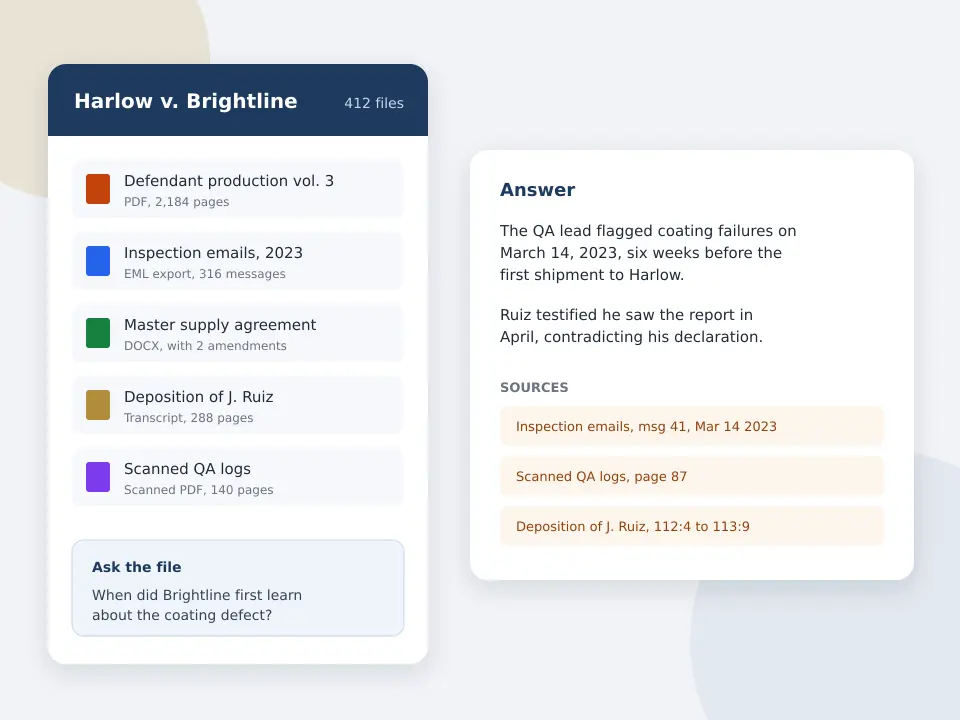
CaseClerk is AI for employment lawyers who need a personnel file, a stack of emails, policies and pay records read before a demand letter, an agency response or a deposition. Upload the documents, ask in plain English, and get the answer with the document and page behind it. Solo is a flat $99 a month for 2,500 pages.
CaseClerk reads the documents you upload and cites the page. It does not file charges, calculate damages, run payroll audits or give legal advice. A lawyer opens and checks every cited page.
Try it on an employment file you already know
Upload a closed termination or wage matter and ask questions whose answers you know. Open each cited page and check. After signup, try 25 pages across up to 5 files, no card.
Free preview, no account needed: up to 3 files and 10 pages.
How can AI help employment lawyers with personnel and dispute files?
AI helps employment lawyers by reading every document in a matter and answering the questions that decide it, each with the page it came from. When the first warning was issued, who approved the termination, what the handbook said on the date, which emails mention the complaint. CaseClerk does this from $99 a month for 2,500 pages.
It reads. You decide. Every answer is a pointer to a page you open and verify before it goes into a demand letter, a position statement or a deposition outline.
- $99
- Solo monthly plan, 2,500 pages read
- About $20
- To read a worked 500 page termination file on Solo
- Page cites
- Every answer names the document and page
- 5 files
- Trial after signup, 25 pages, no card
What AI for employment lawyers has to do with a real file
- Rebuild the timeline of a termination
- Hire date, reviews, warnings, the complaint, the decision and the termination letter, ordered by date and linked to the page that states each one.
- Read the email and chat export
- Ask which messages mention the complaint, who copied HR and what was said after the protected activity, with the page of each.
- Check the policy that applied
- Upload the handbook versions and ask what the policy said on the date of the event, and whether the employer followed it.
- Pull pay facts from payroll exports
- Ask for the pay periods, hours and rates a records set shows for a wage claim, then open the page to verify each figure.
How an employment file review works in CaseClerk
-
1
Create a matter for the employee or the charge
One vault per matter keeps the documents apart from every other file.
-
2
Upload what you have
Personnel file, emails, policies, pay records, the agency charge and the response. Scans are fine.
-
3
Ask the questions you would ask a paralegal
What did the employee know and when, who made the decision, what changed after the complaint.
-
4
Open every cite
Read the passage in context and quote from the original page, never from the answer alone.
Ways an employment practice gets through a file
Most firms combine several. A lawyer or paralegal reads the key documents, an ediscovery platform hosts large productions, a practice suite holds the matter record, and a cited reader answers questions about a pile of documents. CaseClerk is the reader and it is priced flat. The others win at their own jobs.
| Paralegal reading | Ediscovery platform | Practice suite | CaseClerk | |
|---|---|---|---|---|
| Main job | Judgment and summaries | Host and review large productions | Billing, calendar, matter record | Answer questions about the file |
| Cites the source page | If the notes do | Document level | Not its job | Yes, document and page |
| New question on the same file | Another read | Search and tag | Search | Ask again, same file |
| Price model | Hourly or salary | Quote, often per GB | Per user per month | Flat monthly, $99 to $998 |
| Best for | Decisions and drafting | Large productions | Running the practice | Fast, cheap first read of every file |
| Where it wins | Knowing the client | Scale and production | Workflow | Price and cited answers |
Where employment lawyers use it
Before a demand letter
Build the timeline and list the documents that support each element before you write to the employer.
For an agency response
Find what the employer said in its position statement and compare it with the documents it produced.
Before a deposition
Pull every message and record about one manager or one decision into a short list with page cites.
At intake on a wage claim
Read the pay records a client brings and list the pay periods and rates before you decide whether to take the case.
Why an employment file is where hours disappear
An employment matter is paper from many hands: the offer letter, annual reviews, warnings, a complaint, a handful of emails, the handbook, a termination letter and often an agency charge. The facts that decide the case sit in the order of events, and rebuilding that order by hand takes a full day on a mid sized file.
A cited reader takes the first pass. For the dated narrative see case chronology software, for turning a transcript into usable notes see deposition summary software, and for what a flat reader costs against per seat suites see AI for small law firms.
A worked example, a 500 page termination file
Say a wrongful termination file holds the personnel file and reviews (80 pages), 250 pages of exported email, the handbook and policies (60 pages), payroll records (70 pages) and the agency charge with the position statement and exhibits (40 pages). That is 500 pages. On Solo, 2,500 pages cost $99 a month, so reading 500 pages uses 20 percent of the month, roughly $20.
Read by hand at an assumed 40 pages an hour, the same file is 12.5 hours. At an assumed $150 an hour of paralegal time that is about $1,875. Both numbers are assumptions, not measurements, and yours will differ. The shape matters: the reader runs once per file, and later questions reuse the file.
Who it is for and who it is not for
It suits solo and small employment firms, on either side of the case, who read their own files or have one paralegal. It also suits a lawyer taking a wage or termination claim on contingency, where unbilled reading hours are the cost.
It is not a case management system, a damages calculator or a filing tool. The agency charge process itself is set out by the U.S. Equal Employment Opportunity Commission, and CaseClerk does not file anything for you. If you also want calls from prospective clients answered and qualified, a service such as Messageagent handles that side. Check your firm's policy and ABA Formal Opinion 512 before uploading confidential material to any AI tool.
AI for employment lawyers, questions from practitioners
Can AI help employment lawyers review personnel files?
What does AI for employment lawyers cost?
Can it build a timeline of a termination?
Is it safe to upload employee records?
Can it read scanned documents and email exports?

Read your next employment file with cited answers
After signup, try 25 pages across up to 5 files, no card. Ask about dates, decisions and policies, then open every source. Plans from $99 monthly.
Start free trialKeep reading
Case chronology software
A dated chronology with page cites.
Deposition summary software
Transcripts into cited summaries.
AI paralegal
A flat priced reader for paralegal hours.
AI for small law firms
What a flat reader costs against per seat suites.
Legal document review software
Read and question large document sets.
Choose your plan
Put one matter in a vault and ask it the question you would ask a colleague
Sign up