Clearbrief Pricing and Clearbrief Cost per User for Litigators
Clearbrief costs $300 per user a month on the Solo plan, and Enterprise Unlimited is quoted. Directory listings still show $150. Yearly cost for 1 to 10 users, what you get, and cheaper options.
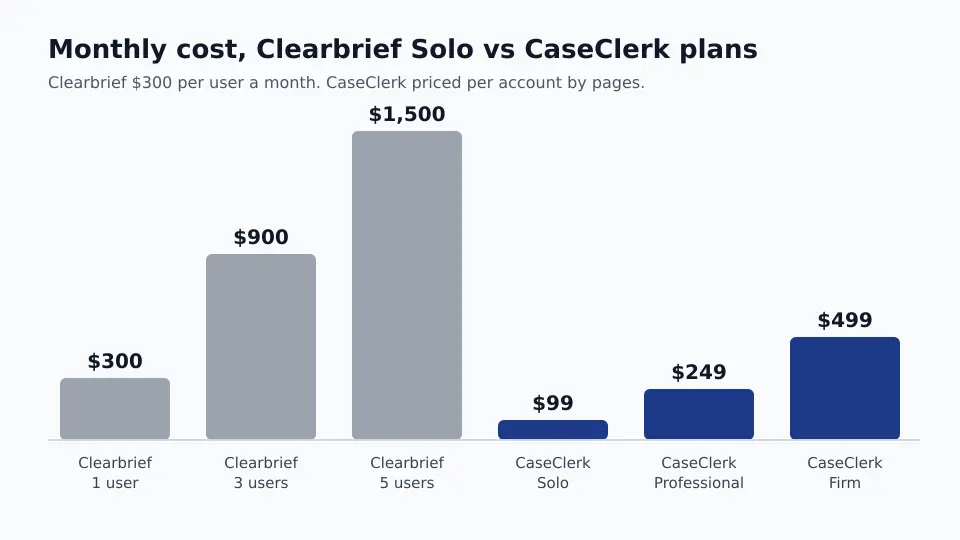
Clearbrief costs $300 per user per month on the Solo plan, and Enterprise Unlimited is a custom quote with volume discounts. That is what clearbrief.com/pricing prints today. Solo is bought online, multi-year agreements lower the rate, and the page lists no annual price, no per-brief price and no trial length.
The problem is that the figure most people find first is different. The LawNext directory, the one third-party page that shows a number, still lists $150 per user a month and a $300 per-brief option, on a page last updated in April 2025. G2 and Capterra show no price at all. So if you budgeted Clearbrief from a directory, your number is likely half of what the vendor now asks. Below is the current price, what changed, the yearly cost for 1 to 10 users, what you get for it, and when a cheaper tool does the part of the job you actually need. If you are pricing several tools at once, our legal AI pricing comparison puts the published prices side by side.
How much does Clearbrief cost?
Clearbrief Solo is $300 per user per month, and Enterprise Unlimited is priced by quote. Solo has a Purchase Now button, so a single litigator can buy it without a sales call. Firms that want a lower rate are told to ask about multi-year agreements. Enterprise adds volume discounts and one-on-one training for the team, and it starts with a scheduled meeting.
| Plan | Price | What you get | How you buy |
|---|---|---|---|
| Solo | $300 per user a month | Fact-cite analysis inside Word, Table Builder, timelines and summaries, investigation reports with hyperlinked citations, tables of authorities, exhibit hyperlinking, cross-examination outlines | Online, Purchase Now; multi-year agreements for a lower rate |
| Enterprise Unlimited | Custom quote | Everything in Solo for the team, volume discounts, 1:1 training on responsible AI use | Schedule a meeting with sales |
| Academic | No charge (per the LawNext directory) | Access for law students and professors | Academic signup |
Why directory prices for Clearbrief are out of date
Most budget numbers for legal software come from directories, and directories rarely refresh. Here is what each source shows for Clearbrief right now.
| Source | Price shown | Date on the page |
|---|---|---|
| clearbrief.com/pricing (vendor) | Solo $300 per user a month, Enterprise custom | Current page |
| LawNext Legal Technology Directory | $150 per user a month, or $300 per brief on request | Last updated April 2, 2025 |
| G2 | No pricing provided | n/a |
| Capterra | Features and ratings, no price | n/a |
Two things changed between the directory listing and today. The per-user price doubled from $150 to $300, and the per-brief option is no longer printed. LawNext described per-brief billing as a way to recover Clearbrief as a case cost on contingency matters. That option may still exist on request, but the vendor page does not mention it, so ask before you build a cost-recovery plan around it.
What does Clearbrief cost per year for a small firm?
At $300 per user a month, a solo litigator pays $3,600 a year and a five lawyer team pays $18,000, before any multi-year or volume discount. Every person who works in the brief needs a seat, which is where the cost climbs.
| Users | Clearbrief Solo per month | Clearbrief per year | CaseClerk (per account, not per user) |
|---|---|---|---|
| 1 | $300 | $3,600 | $99 a month Solo (2,500 pages) |
| 3 | $900 | $10,800 | $249 a month Professional (10,000 pages) |
| 5 | $1,500 | $18,000 | $249 or $499 a month, by pages |
| 10 | $3,000 | $36,000 | $499 a month Firm (30,000 pages) or $998 Enterprise (60,000 pages) |
The CaseClerk column is not a like-for-like swap, and we will get to why. It is there because many litigation teams buy a brief tool when the slow part of their week is actually reading the record. If that is you, the price gap matters.
What Clearbrief does well
Clearbrief is built for the moment a brief meets the record. It runs as an add-in inside Microsoft Word, reads the sentences you have written, and finds the support for each one in your exhibits, depositions and case law. That is a real job and Clearbrief is good at it.
- Fact-cite checking in Word. Analyze and Add Fact-Cite suggests the record support for each factual statement and flags weak spots, without leaving the document.
- Hyperlinked filings. Exhibits and citations become clickable links, which some judges now prefer and some courts encourage.
- Tables of authorities. TOA generation is built in, which saves a paralegal an afternoon on every long brief.
- Timelines, summaries and cross outlines. Table Builder, timelines and instant cross-examination outlines cover some pretrial work too.
- Security posture. Clearbrief states it is SOC 2 Type 2 certified, does not use customer data to train language models, lets the customer control whether generative AI is used, and offers Bring Your Own Storage.
- LexisNexis tie-in. The pricing page advertises an exclusive LexisNexis discount for Clearbrief solo and small firm customers.
Is Clearbrief worth it for a small litigation firm?
Clearbrief is worth $300 a seat if your team writes a lot of briefs and spends real hours cite-checking and hyperlinking them in Word. If the bottleneck is earlier, finding the facts and the page they sit on before anyone drafts, a reading tool priced per account usually costs a fraction as much.
Think about where the hours go on a typical motion. On a summary judgment brief, an associate might spend two days reading depositions and the production to pull the facts, then half a day checking cites. Clearbrief speeds up the second part, and it helps with the first only once a draft exists. CaseClerk works on the first part: you upload a matter to CaseClerk, ask "when did the plaintiff first report the injury to HR?" or "which witnesses say the light was red?", and get an answer that names the document and page. Up to 1,000 files per case, 20 file formats, and the price is for the account, so three litigators on one Professional plan pay $249 a month instead of $900.
CaseClerk does not work inside Word, does not build tables of authorities and does not hyperlink a brief. If those are the jobs you are paying for, Clearbrief is the better buy. Plenty of firms end up with both: the reading tool before drafting, the brief tool at the end. For the wider set of pretrial work, see our page on trial preparation software.
Clearbrief alternatives and what they cost
These tools overlap with Clearbrief on at least one job and print a price you can budget from. CoCounsel and Lexis+ AI pricing are quote only, so they are covered separately, as is CoCounsel pricing.
| Tool | Printed price | Billed per | Best for |
|---|---|---|---|
| Clearbrief | $300 a month (Solo), Enterprise quoted | User | Cite-checking and hyperlinking briefs inside Word |
| Paxton | $499 a month or $2,999 a year (Individual) | User | Legal research and drafting for solo attorneys |
| Irys | $299 a month (One), $329 a seat (Teams, 2 to 25) | Seat | Research and drafting workspace for small teams |
| Casefleet | $30 Starter (no AI), $140 Advanced AI | User | Litigation chronologies and fact databases |
| CaseClerk | $99, $249, $499 or $998 a month | Account (by pages) | Reading a whole matter and answering questions with the source document named |
Casefleet is the closest to the timeline side of Clearbrief. Its Advanced AI plan went from $75 to $140 a user in 2026, which we break down in Casefleet pricing, and our Casefleet alternatives page covers the chronology tools as a group.
Sometimes the job is smaller than any of these. If you only need to question one long expert report or a single policy, a tool to chat with a single PDF may be all it takes, and you can skip a per-seat contract entirely.
How to get a better price from Clearbrief
- Ask for a multi-year rate. The vendor page says so outright. Get the two and three year numbers in writing before you sign Solo month to month.
- Count seats honestly. If only two people write briefs, do not license the paralegals who only assemble exhibits.
- Ask about per-brief billing. It was offered in 2025. On contingency work it can turn a fixed cost into a recoverable case cost.
- Use the LexisNexis discount if you are already a Lexis customer. The pricing page advertises one for solo and small firms.
Clearbrief pricing questions
Does Clearbrief have a free trial?
Clearbrief's pricing page does not list a free trial or its length. It offers a demo and a Get Access button, and Solo can be bought directly. Ask sales whether a trial period applies before you buy. Law students and professors get free academic access, according to the LawNext directory.
Is Clearbrief per user or per brief?
Clearbrief is priced per user. The Solo plan is $300 per user per month and Enterprise is a custom quote. In 2025 the LawNext directory also listed a $300 per-brief option for contingency cost recovery, but the current vendor page does not print it, so confirm it with sales.
Does Clearbrief work with Word?
Yes. Clearbrief runs as an add-in inside Microsoft Word and is available from the Microsoft Store. You write in Word as usual, and Clearbrief checks factual statements against your record, suggests citations, hyperlinks exhibits and builds tables of authorities without leaving the document.
Is Clearbrief secure?
Clearbrief says it is SOC 2 Type 2 certified and that customer data is never used to train large language models. Customers decide whether generative AI is used on their documents, and a Bring Your Own Storage option keeps files in the firm's own cloud. Security questions go to the vendor directly.
Before you commit $3,600 a seat a year, test the reading half of the job on a matter you know well. Upload a few files from a closed case to CaseClerk, ask the questions you would answer before drafting, and check the cited page behind each answer. 25 pages and up to 5 files on the house, no card, then plans from $99 a month on our pricing page.